Module Upgrades, New Cropping Tool, and Multiple Images Per Item
We are also seeing an uptick in organizations starting to create their 2026 events.
By GiveGrove • 1 min read • Published 2025

Remember, you never pay to create your event in GiveGrove, so if you want to reserve your URL, create your event today!
We are still chugging away with new updates to make your lives a little easier. Read below to see what’s new!
Module parity and new table features
We’ve added new tables, new module stats at the top of the page, new menu buttons, and pagination to all modules on the admin side of the site. We had heard feedback that organizations enjoyed the new tables and features in the ticketing module, so we went through and added those features to all the other modules.
A new way to search
In the Live Auction module, we’ve added search bars to the charge request and paddle assignment tables. This will make searching for a donor or a transaction faster and more efficient for check-in / out.

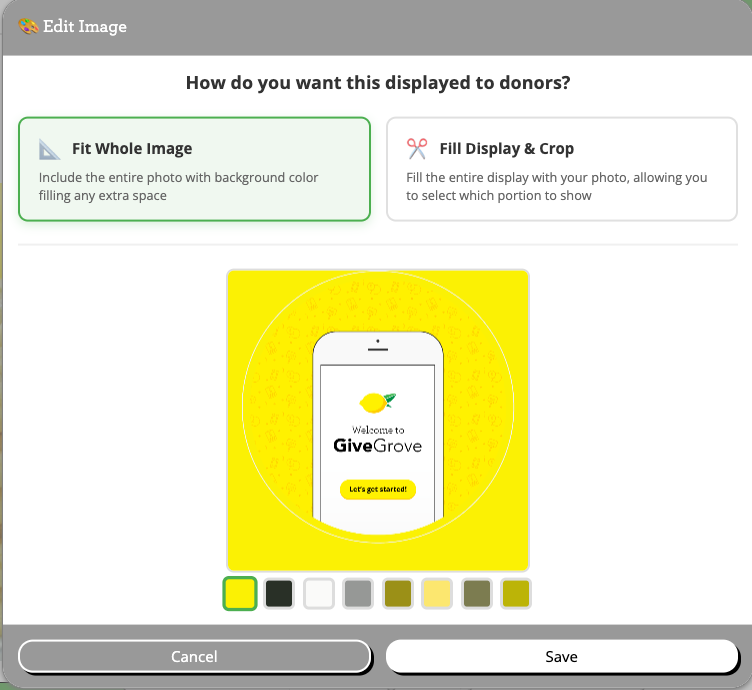
Image upload and cropping
One of the most frusrating pinchpoints was around our image uploading tool. We have replaced it with a new uploading feature which brings a lot of fun new features!
🎨 Intelligent auto-squaring
🖱️ Professional drag-to-pan
📸 High-resolution output
📐 Dual aspect ratio support
GiveGrove will now detect the colors in the image that you are trying to upload, and if needed, provide a suggested palette of matching colors that will make your image square and look professional, putting your first foot forward with your donors.
Multiple Images per Item
We also have received several requests to allow organizations to add multiple images per item. Sometimes if you have a great item for your fundraiser, you want to be able to share multiple images of that item without having to link out to provide more images. Now, you can add up to 5 images to an item that your donors can cycle through.
Once you select your images, our system will save the images and you can edit and crop as needed.
💬 Have Feedback or Feature Ideas?
Email us at info@givegrove.com, or just book a quick check-in and let’s chat.
Thanks for trusting GiveGrove with your fundraisers! 🍋
GiveGrove makes events and auctions for fundraising easy. Check us out at GiveGrove.com or email info@givegrove.com for more info. Click here to sign up for our mailing list.